Extension
This browser extension is designed to enhance your PDF editing and conversion experience. With this extension, you can easily convert PDFs into MMD (Mathpix Markdown) format, edit the content, and export it as a shareable HTML file. Below are the detailed instructions and features of the extension.
Installation
To use this extension, follow these steps:
-
Download the Extension: You can download the extension from my GitHub repository.
-
Load the Extension:
- Open your browser's extension manager.
- Enable "Developer mode".
- Click on "Load unpacked" and upload the entire folder containing the extension files.

-
Using the Extension:
- Open any PDF file in your browser.
- Click on the extension icon.
- Select the MMD file you previously converted.
- Click "Convert". The page will split into two sections for a better editing experience.
Extension Features
1. Split View for Editing
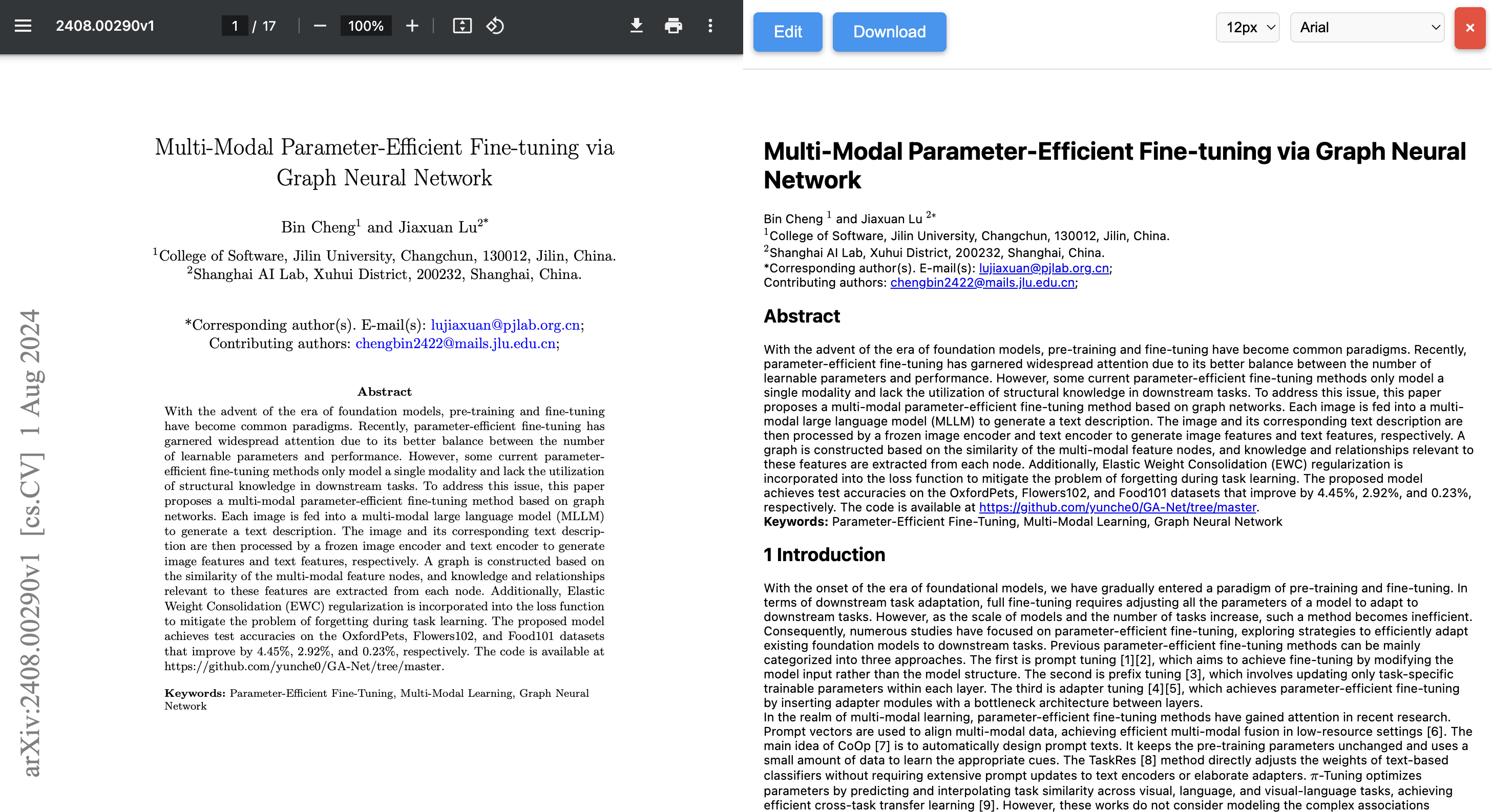
Once you click "Convert," the page will be divided into two sections: - Left Side: Displays the original PDF. - Right Side: Displays the converted MMD content.
This split view allows for a seamless editing experience.
2. Top Menu Options
- At the top of the page, you will find the following options:
- Edit Button: Opens the MMD editor for content modification.
- Download Button: Allows you to download the edited content.
- Font Size Selector: Adjusts the text size for better readability.
- Font Family Selector: Changes the font style of the displayed content.
3. MMD Editor
-
In the MMD editor, you can:
- Edit the Content: Modify the MMD content directly within the browser.
-
Insert Images:
- Click where you want to insert an image.
- Right-click and select "Insert Image".
- Fill in the fields, such as:
- Image URL: Link to an online image.
- Image Caption: Description of the image.
- Width and Height: Adjust the size of the image.
- Orientation: Set how the image should be aligned.
Note
If the image is stored locally on your PC, use the absolute path prefixed with
file:///.Info
Since we use Mathpix MMD as our document format, you can learn more about how to edit images by visiting this guide on Mathpix MMD Mathpix mmd
Warning
Important: If using local images, ensure that the HTML or MMD file is saved in the same directory or upload the image online for better accessibility.
-
Insert Tables:
- Right-click in the editor and select "Insert Table".
- Choose the CSV file from your PC.
-
Enter a caption for the table and insert it.
Info
Since we use Mathpix MMD as our document format, you can learn more about how to edit tables by visiting this guide on Mathpix MMD Mathpix mmd
4. Viewing and Additional Features of the Downloaded HTML File
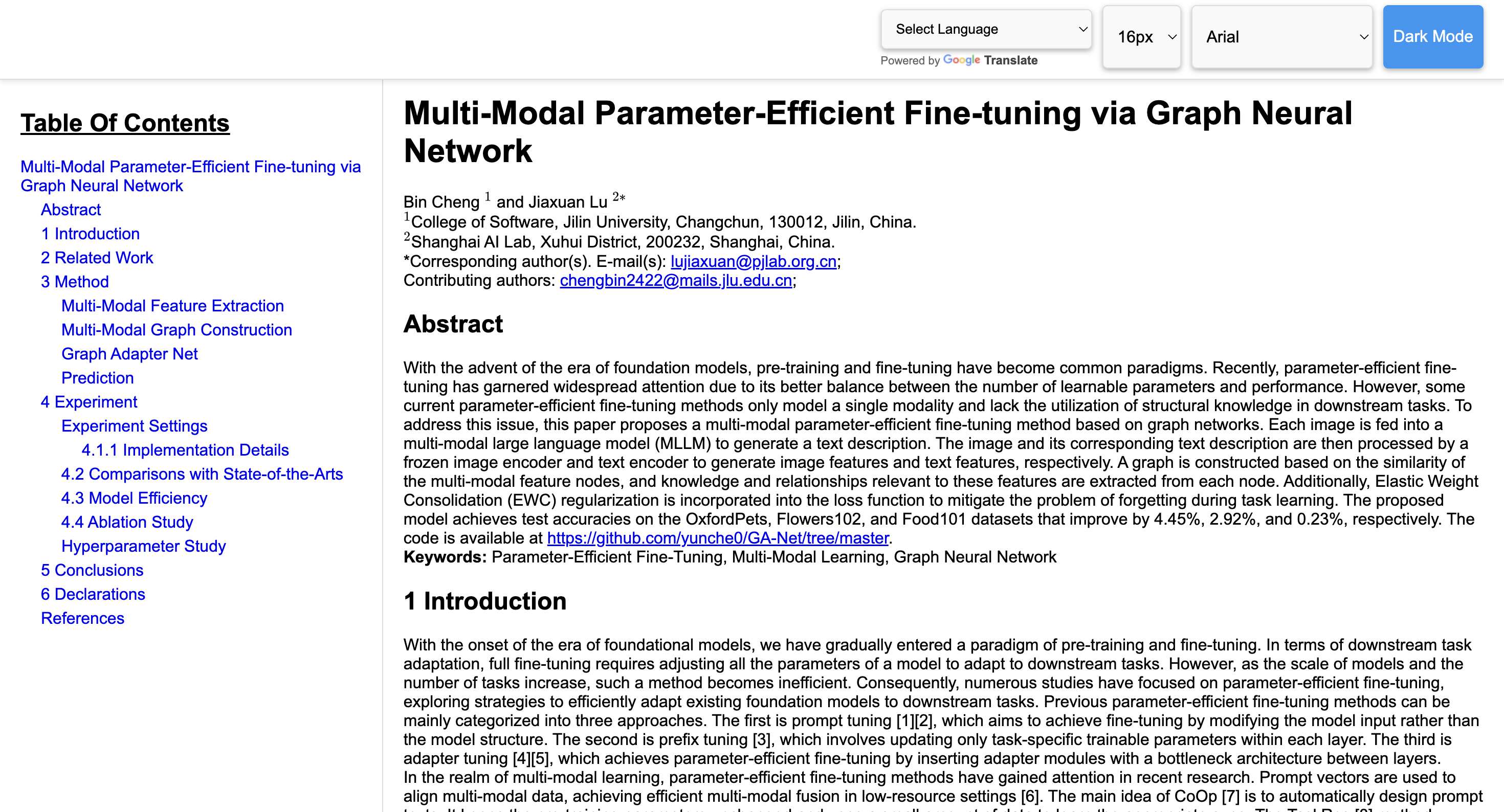
- The downloaded HTML file includes several features:
- Translator Button: Allows you to translate the content into different languages.
- Dark Mode Toggle: Switches between light and dark themes for better readability.
- Font Family Selector: Choose different fonts to customize the appearance.
- Font Size Selector: Adjust the text size for optimal viewing.
- Table of Contents: Linked with the research paper for easy navigation.
The HTML file is fully shareable, including any images if they were inserted as a package.
Future Features
- We're continuously working to improve the extension. Upcoming features include:
- Better Image Integration with HTML: Enhancing the way images are displayed and managed within the HTML file.
- Mobile Compatibility: Making the extension more mobile-friendly.
- Direct PDF Conversion: Enabling direct conversion of PDFs without the need for MMD.
Stay tuned for updates, and feel free to contribute or suggest features through our GitHub repository.